

helm upgrade can exit 0 while the release sits in
pending-install and nothing serves traffic. Terraform and Helm skip when state already matches, so
a component reports Active while its pods are stuck. Something fixed by hand out of band keeps
showing yesterday’s error.
Component health answers the live question instead — continuously, per component, on every install.
It’s a separate axis: Nuon never overwrites deploy status with health or the other way round.
See what's actually running
Every resource each component manages, with live status, browsable per install.
Get told when it breaks
Debounced alerts to Slack and webhooks, with the failing resource and why.
Gate your deploys
A deploy isn’t done when
helm exits — it’s done when the component stays healthy.Prove it stayed up
90 days of timeline and uptime per component and install.
Turn it on
1
Ask Nuon to enable it
Component health is behind the
component-health org feature. Ask us to switch it on for your
organization — there’s nothing to install and no agent runs in your customers’ clusters.2
Deploy, or refresh cluster access
Health reads your customers’ clusters using the same access your deploys already use. An install
that hasn’t deployed since the feature was enabled needs one deploy — or click Refresh cluster
access on the install’s health card to pick it up immediately.
3
Open the install's Resources tab
Within a minute or two you’ll see every resource each component manages, with per-resource
health, filterable by component, kind, namespace and status.
No configuration is required for any of this. Everything below is optional and only extends what
already happens.
What you get with no configuration
Helm chart and Kubernetes manifest components are checked automatically, about once a minute. Standard workloads — Deployments, StatefulSets, DaemonSets, Pods, Services, PersistentVolumeClaims, Ingresses and Jobs — plus the Helm release’s own status. Your custom resources too. Nuon reads the kinds your chart or manifest actually ships, so aCertificate, an Issuer, a Karpenter NodePool or your own CRD is watched like anything else. A
component that starts shipping a new kind picks it up on its next deploy or drift check.
Controller-side failures. Some failures never appear in an object’s own status — an Ingress whose
load balancer rejected a certificate looks fine if you only read the Ingress. Nuon reads Kubernetes
warning events too, so those surface as well.
Terraform components get their cloud resources listed so you can see what a component owns. Those
rows are inventory, not assessment, so they don’t move the verdict on their own — add a probe or a
custom check to give a Terraform component a real verdict.
How a verdict is reached
The worst thing observed sets the verdict. A component is only as healthy as its unhappiest part.
Two rules are worth knowing, because they’re why you won’t get paged at 3am for nothing:
Verdicts are debounced. Three consecutive bad observations flip a component bad; two good ones
bring it back. A single pod restart or a controller backing off doesn’t alert.
Absence of data is never failure. If observations stop for five minutes the verdict becomes
unknown — visually distinct from a failure, and it never alerts. Nuon doesn’t guess in either
direction.
Choosing a check
Three ways to add your own signal. They compose freely — most components need none of them.Probes work on every component type, including Terraform. You don’t need a Kubernetes footprint,
and you don’t need to write an action. If Nuon can reach it over HTTP, TCP, or a command, a probe is
the simplest thing that works.
Probes
Probes assert your app is actually serving, above the level of infrastructure. A Deployment can be perfectly ready while the thing inside it returns 500.httppasses on 2xx/3xx and never follows redirects.tcppasses if the port accepts a connection.execpasses on exit code 0 and reports the command’s output when it fails.
exec commands are an argv, never a shell string, and run with a minimal environment (PATH,
HOME, TMPDIR) — they can’t see the runner’s credentials. Every probe is bounded by a short
timeout and runs once per cycle.
Probe results are ordinary observations: same verdict, same debounce, same alerts, same history.
Templated targets are resolved from the install’s state, so a probe pointing at a component’s own
output can’t resolve until that component has applied at least once. Until then the probe reports
unknown and says so — it stays visible rather than silently vanishing, and it never fails a deploy.Custom checks
For anything Nuon can’t reach — a business metric, a queue depth, something your CI already computed — push it in and it becomes part of the component’s health.status is one of healthy, degraded, unhealthy, unknown. Names are 1–100 characters of
letters, digits, dots, dashes or underscores.
A custom check can make a component worse, never better. Reporting healthy will not paper over
crash-looping pods.
Say how often you’ll report. A check’s last value stands for 5 minutes by default. If yours
reports less often, set stale_after (up to 60m):
unknown rather than keeping its last answer — it stays visible but
stops voting, because a stale answer isn’t an answer.
Required checks
Sometimes a deploy shouldn’t be considered finished until something outside Nuon confirms it — migrations applied, a smoke suite green, a canary analysis passed. List those by name and the deploy waits for them, the same way a GitHub branch rule waits for a required status check.unknown and only counts once it reports, so a value left
over from a previous deploy can’t satisfy the gate for this one.
Example: gate a deploy on a k6 smoke suite
Say you want no deploy to count as finished until k6 has run a smoke suite against the install and Datadog confirms error rate is within budget. Both are things only your systems know, so both are custom checks — and both are listed as required.The same pattern works with anything that can make an HTTP call: a Datadog monitor webhook, a Grafana
alert, a GitHub Action, an Argo workflow step, a nightly audit job. Nuon doesn’t care what produced
the answer — only that it arrived after the apply and inside the window.
Alerting
Health transitions fan out through webhooks and Slack like any other Nuon event. Subscribe with a single per-resource flag:component_healthoncomponents— delivers both directions, so a channel that hears about a failure always hears the recovery.install_degradedoninstalls— the install-level rollup crossing. Usually you don’t need this as well: when a component’s failure is what moved the install, the component alert reports both in one message.
install degraded and an Install health field carries
healthy → degraded — rather than a second, separate install message arriving alongside it.
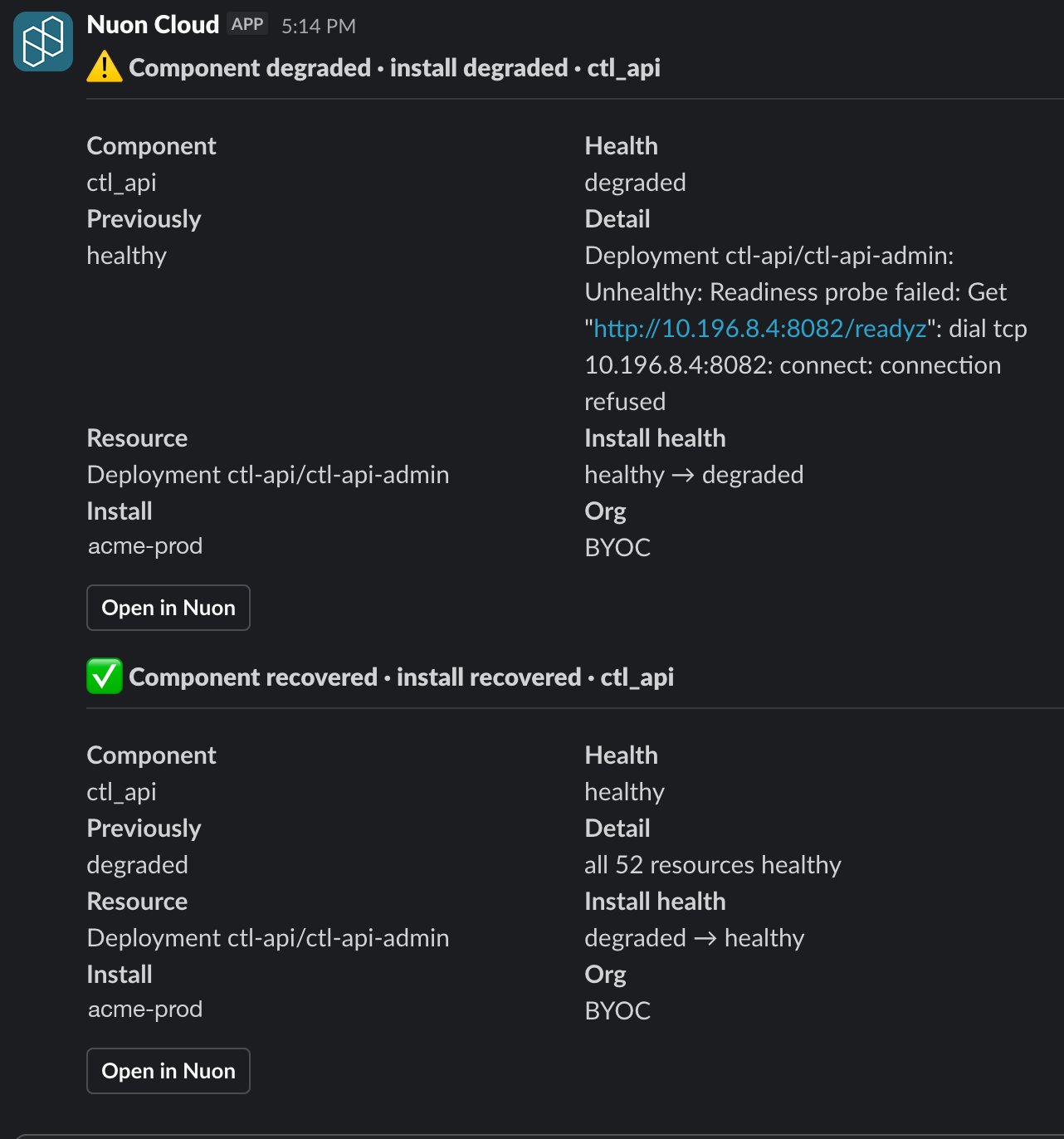
A component degrading and recovering, delivered to Slack.
unknownnever alerts. A runner going offline is already reported as runner inactivity, and would otherwise page you once per component.- Only root causes alert. When a component fails because something it depends on failed, the
dependents are labelled
downstream of <component>and stay silent. One outage, one alert. - Recoveries are always paired with the failure that preceded them.
Verified deploys
By default a deploy finishes when the apply succeeds. Setblock_deploy and it finishes only once
the component has held healthy for stabilization_window afterwards.
Canary and bake periods
The pieces above compose into progressive delivery. The primitive is a fleet health summary scoped by install label:tier=canary, hold until all_healthy has stayed true for your bake
period, then continue to the rest of the fleet.
all_healthy is never true unless at least one install was actually evaluated, and installs that
have never been evaluated are counted separately in unset. A rollout must never read “no data” as a
pass, so the endpoint won’t let it.
Uptime and incidents
Every debounced transition is kept for 90 days, giving each component and install a timeline and an uptime percentage, drawn as status-page-style daily bars. The badge and the percentage answer different questions: the badge is the verdict right now, the percentage is the last 90 days. A component readingHealthy at 97.57% is currently fine and had
a bad spell earlier — and because an install is degraded whenever any of its components is, that one
component is what sets the install’s number.
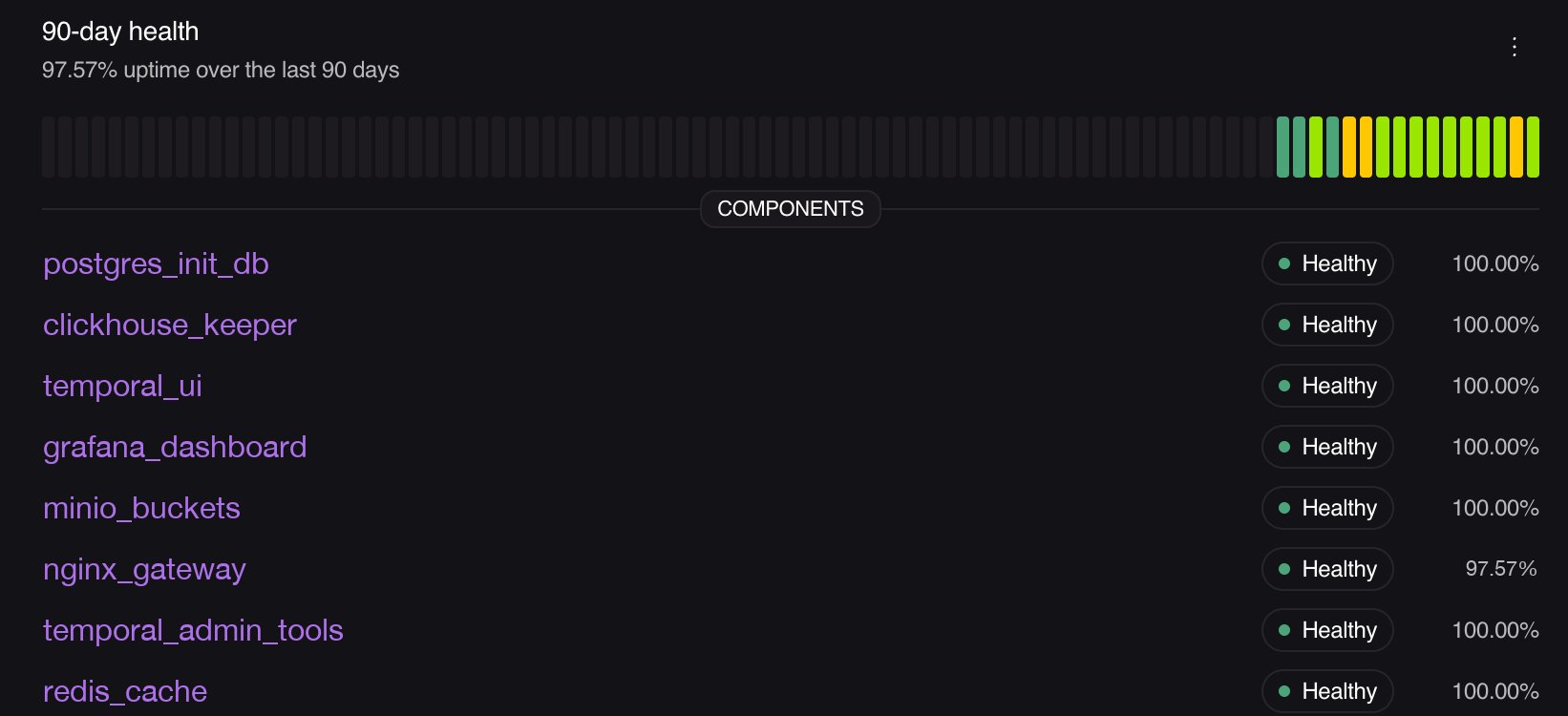
90-day health for an install, with per-component uptime.
unknown is excluded from uptime rather than counted as up or down — Nuon won’t claim
availability it didn’t observe. An install with no observations reports zero observed time instead of
a misleading 100%.
There’s also an incident bundle per component, pulling together the failing transition, the captured
diagnosis (Kubernetes events, restart counts, termination reasons like OOMKilled) and the deploy it
followed — useful as input to a runbook or an agent.
Troubleshooting
Everything shows unknown or no resources at all
Everything shows unknown or no resources at all
Nuon can’t reach the cluster. This is almost always an install that hasn’t deployed since
component health was enabled. Click Refresh cluster access on the install’s health card, or
run any deploy. Resources should appear within a minute or two.
A component shows a dash instead of a verdict
A component shows a dash instead of a verdict
That’s
not-applicable — either the component has no observable runtime footprint (a Terraform
component with no probe, a build-only component), or it has never deployed. Add a
probe or a custom check to give it a verdict.My custom resources aren't listed
My custom resources aren't listed
Kinds are read from what your chart or manifest actually ships, and are picked up on deploy. If
you’ve just added a CRD, deploy the component once — or wait for its next drift check, which
also refreshes them without applying anything.
A custom check went unknown on its own
A custom check went unknown on its own
Its window expired. Set
stale_after to match how often you actually report, up to 60m.A verdict took a few minutes to change
A verdict took a few minutes to change
That’s the debounce: three bad observations to flip, two good to recover, at roughly one
observation a minute. It’s what stops a single restart paging anyone.
My deploy failed on a required check that did run
My deploy failed on a required check that did run
It has to be pushed after the apply finishes, and be healthy when the window closes. A value
pushed before the deploy started doesn’t count for that deploy.