> ## Documentation Index
> Fetch the complete documentation index at: https://docs.nuon.co/llms.txt
> Use this file to discover all available pages before exploring further.
# App Branches
> App branches connect a git branch to your app, so a push rolls the change out across your fleet of customer installs through ordered deployment groups with a plan and an approval at every step.
## What is an App Branch?
An app branch connects one git branch to your [app](/concepts/apps). When you push to that branch, Nuon fetches the
config at that commit, builds whatever changed, and then rolls the new version out across your customer
[installs](/guides/app-install-life-cycle), in an order you define, with a plan and an approval gate in front of
every step.
Before app branches, updating a fleet meant running `nuon apps sync` from your CLI or wiring up a GitHub Action with
an API token, then driving each install yourself. An app branch makes the git push the trigger, and makes the rollout
a single reviewable workflow instead of a sequence of manual steps.
If you are new to Nuon, read [apps](/concepts/apps) and the [app and install life
cycle](/guides/app-install-life-cycle) first.
## The end-to-end flow
```mermaid theme={null}
flowchart TD
push["git push to the tracked branch"] --> fetch["fetch commit
clone the repo at that SHA"]
fetch --> config["fetch app config
parse and sync the app config"]
config --> build["building components and sandbox
only what changed since the last successful run"]
build --> plan1["plan install group: staging
diff per install"]
plan1 -->|approve| deploy1["deploy install group: staging"]
deploy1 --> plan2["plan install group: production
diff per install"]
plan2 -->|approve| deploy2["deploy install group: production"]
```
Each box is a step in a single workflow, visible in the dashboard and in the CLI workflow TUI. The step names above
are the real ones you will see. Two of them behave specially:
* **`plan install group: `** is an approval step. It computes the config diff for every install in the group and
then waits. Nothing is applied to those installs until a human approves it in the dashboard, or an API caller
advances it.
* **`plan install group: `** and **`deploy install group: `** are skippable, so you can let a rollout
move past a group without deploying to it.
**`building components and sandbox`** builds your components on every run. It also builds the
sandbox into an artifact when [sandbox builds](/guides/sandbox-builds) are enabled for your org —
without that feature it builds components only.
Groups run in the order you declare, and the approval in front of each group is what makes the rollout staged: group
two does not start until you approve it.
 ## Run types
Every run of an app branch is an *app branch run*. There are three kinds, and they differ in what they are allowed to
touch.
| Run type | Triggered by | What it does |
| ----------------- | ---------------------------------------------------------------- | ------------------------------------------------------------------------------------------------------------------------- |
| `git-run` | A push to the tracked branch | Builds, then plans and deploys each deployment group in order. |
| `git-preview-run` | Opening or updating a pull request against the tracked branch | Plan only. Builds and reports the config diff, then stops. Never touches an install. |
| `manual-run` | `nuon apps branches trigger`, the API, the dashboard, or your CI | Same steps as a `git-run`. Add `--preview` and it still plans every group; approvals auto-approve and nothing is applied. |
```mermaid theme={null}
flowchart LR
subgraph git["Git events"]
p["push"] --> gr["git-run"]
pr["pull_request
## Run types
Every run of an app branch is an *app branch run*. There are three kinds, and they differ in what they are allowed to
touch.
| Run type | Triggered by | What it does |
| ----------------- | ---------------------------------------------------------------- | ------------------------------------------------------------------------------------------------------------------------- |
| `git-run` | A push to the tracked branch | Builds, then plans and deploys each deployment group in order. |
| `git-preview-run` | Opening or updating a pull request against the tracked branch | Plan only. Builds and reports the config diff, then stops. Never touches an install. |
| `manual-run` | `nuon apps branches trigger`, the API, the dashboard, or your CI | Same steps as a `git-run`. Add `--preview` and it still plans every group; approvals auto-approve and nothing is applied. |
```mermaid theme={null}
flowchart LR
subgraph git["Git events"]
p["push"] --> gr["git-run"]
pr["pull_request
opened or synchronize"] --> gpr["git-preview-run"]
end
subgraph manual["CLI, API, or dashboard"]
t["trigger"] --> mr["manual-run"]
end
gr --> wf["app branch run workflow"]
gpr --> wf
mr --> wf
```
Merging a pull request starts a `git-run` through the push it makes to the tracked branch.
A `git-preview-run` stops after `building components and sandbox`. The per-group plan and deploy steps are not
created at all, so a pull request cannot touch an install.
A manual plan-only run works differently. `--preview` suppresses the *apply*
and the waiting, not the workflow: the run creates every group's `plan install group` and `deploy install group`
step, each approval gate auto-approves with "Auto-approved in plan-only mode", and the run finishes on its own with
nothing applied. You get the same per-install diffs you would in a real rollout, readable from the completed run.
## Deployment groups
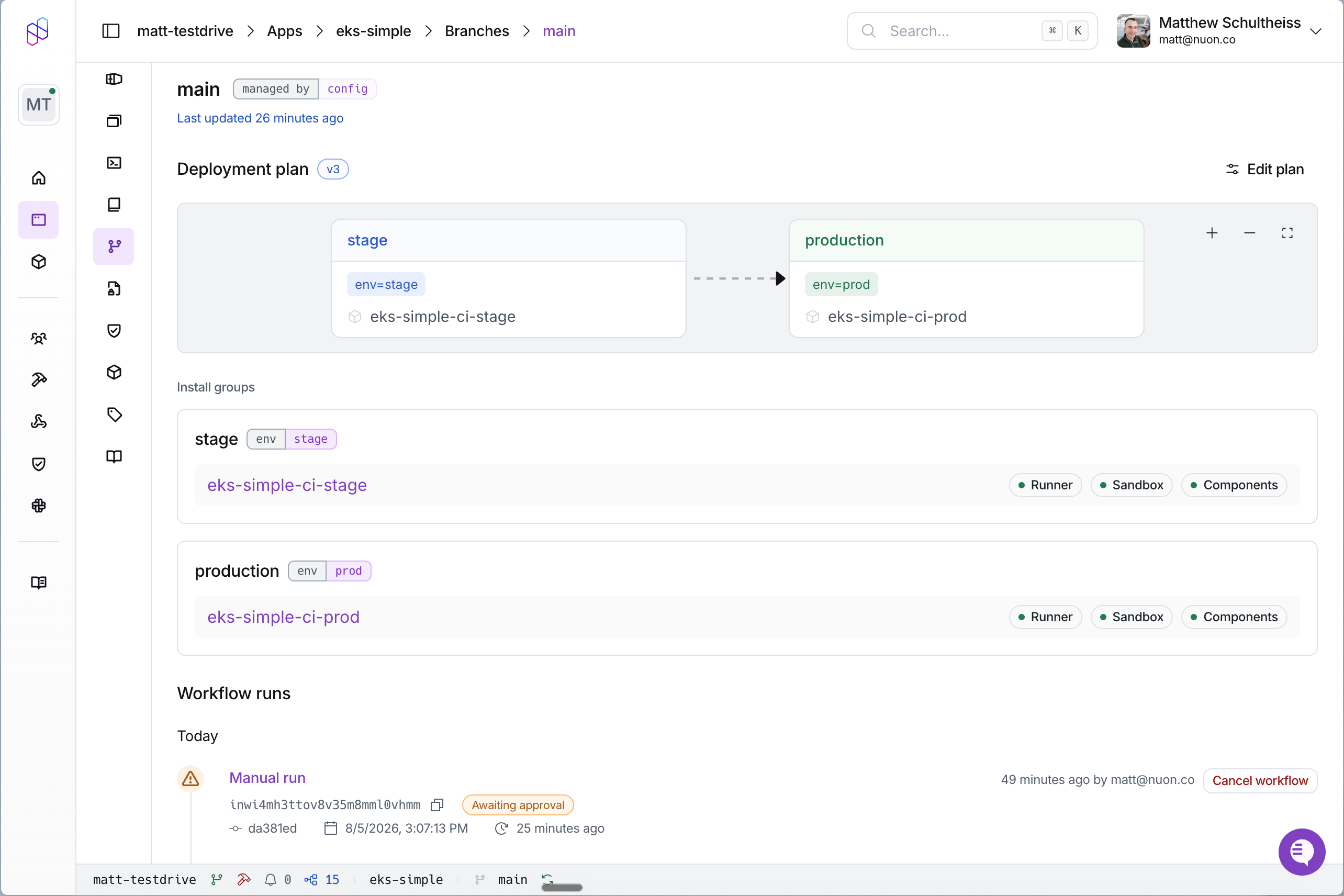
A deployment group is a named subset of your installs that receives an update as a unit. Groups are the unit of
ordering and the unit of approval.
The dashboard calls these **deployment groups**. The TOML key is `install_groups`, and the API routes use
`install-groups`. They are the same thing.
You declare groups on the branch config, and each group picks its installs one of two ways:
* **By labels** — a `label_selector` of key/value pairs. Any install carrying all of those labels is in the group, and
membership updates itself as you label and unlabel installs.
* **Explicitly** — a static list of `install_ids`, or of `install_names` that Nuon resolves to IDs when you sync.
A group uses one or the other; a label selector cannot be combined with an explicit list in the same group.
```toml branch.toml theme={null}
name = "main"
[connected_repo]
repo = "acmeco/my-app-config"
directory = "."
branch = "main"
[[install_groups]]
name = "staging"
order = 1
[install_groups.label_selector]
env = "staging"
[[install_groups]]
name = "production"
order = 2
[install_groups.label_selector]
env = "prod"
```
`order` controls which group deploys first: lower runs first. Declare your groups in the order you want them to run;
an unset `order` falls back to the position in the file.
### Rolling out gradually
A canary is an ordinary first group with a narrow selector: label one or two installs `wave = "early"`, give that
group the lowest `order`, and it plans and waits for approval ahead of everyone else. Approve it, watch it, and then
approve the next group when you are satisfied. There is no separate canary feature to configure.
## Pull request previews
When you open a pull request against a tracked branch, or push another commit to one, Nuon runs a plan-only preview
and reports it on the pull request itself:
* a comment titled `## Nuon Preview — ` (the branch's `name`, so usually `main`), containing a table of
config changes broken down by section
(Section / Added / Changed / Removed) with the individual entries expandable underneath.
* a commit status with the context `nuon/preview`, which moves from pending to success or failure.
If the pull request does not change the app config, the run stops early and the comment reads
``No changes to `nuon.toml` detected in this PR. Preview skipped.``
Posting to the pull request needs an **org-level GitHub connection**, not a particular kind of branch config: your org
must have the Nuon GitHub App connected for the repository's owner. That is satisfied by a `[connected_repo]` branch,
and equally by a `[public_repo]` branch whose owner your org has connected. A public `acmeco/*` repo gets
previews as long as the org has connected `acmeco`. See [connecting a repository](/guides/vcs).
Previews start posting as soon as the GitHub App connection for the repository's owner is in place. If they have
not appeared yet, check that connection rather than the branch config.
## Plans and diffs
Every change a branch run applies to an install is planned and reviewed first. Each `plan install group` step
computes a diff per install in that group.
Branch rollouts always require an approval on each group's plan step. There is no configuration that
auto-approves a deployment group.
## Install version history
Every config change to an install is recorded as an *app config version*: a snapshot of what that install was
expected to be running at a point in time. The history is available per install in the dashboard and over the API,
along with the diff between any two versions.
Because any past version can be applied again, the history doubles as a recovery path: if a change turns out badly,
you re-apply an earlier version rather than hunting for what the old values were. The
[rollback guide](/guides/rollback-install-config) walks through the exact calls.
## Notifications and automation
Branch runs emit the same signals as the rest of the platform, so you can watch them without polling:
* **[Slack](/guides/slack)** — branch run notifications follow your org's existing Slack preferences.
* **[Webhooks](/guides/webhooks)** — branch runs emit workflow and workflow step lifecycle events
(`com.nuon.workflow.lifecycle.v1`) with `data.workflow.owner_type` of `app_branches`, plus an event when an app
config is synced. External systems can react to a plan being ready, or to a group finishing, and can drive the next
approval through the API.
## Rules and limits
Know these constraints before you design your branch layout:
* All branches of one app must point at the **same repository**. The branch and directory within it may differ.
* An install can belong to **one app branch** at a time.
* Two branches of the same app cannot use an **identical label selector**.
* Every push to the tracked branch starts a run. There are no path filters. Scope what a branch watches with the
`directory` field on the repo block.
* `install_names` are resolved to install IDs when you sync, and an unknown name fails the sync. Renaming an install
detaches it from its group until the next sync, which is the main reason to prefer `label_selector`.
## Next steps
Write a branch config, label your installs, trigger runs, and set up pull request previews.
Add an app branch to the `eks-simple` example app end to end.
Every field on `branch.toml`.
How plans, approvals, and diffs work for an individual install.