> ## Documentation Index
> Fetch the complete documentation index at: https://docs.nuon.co/llms.txt
> Use this file to discover all available pages before exploring further.
# Actions
> Automate operational tasks and workflows in installs.
Actions allow you to create automated workflows that can be run in installs.
Actions are useful for debugging, running scripts, and implementing health
checks.
## What are Actions?
Actions are reusable workflows that can be configured to run on your installs.
Each action consists of:
* A trigger that determines when the action runs
* One or more steps that define what the action does
Actions can be used for:
* Running database migrations
* Executing maintenance scripts
* Collecting diagnostic information
* Automating operational tasks
* Running custom health checks
## How do you configure an Action?
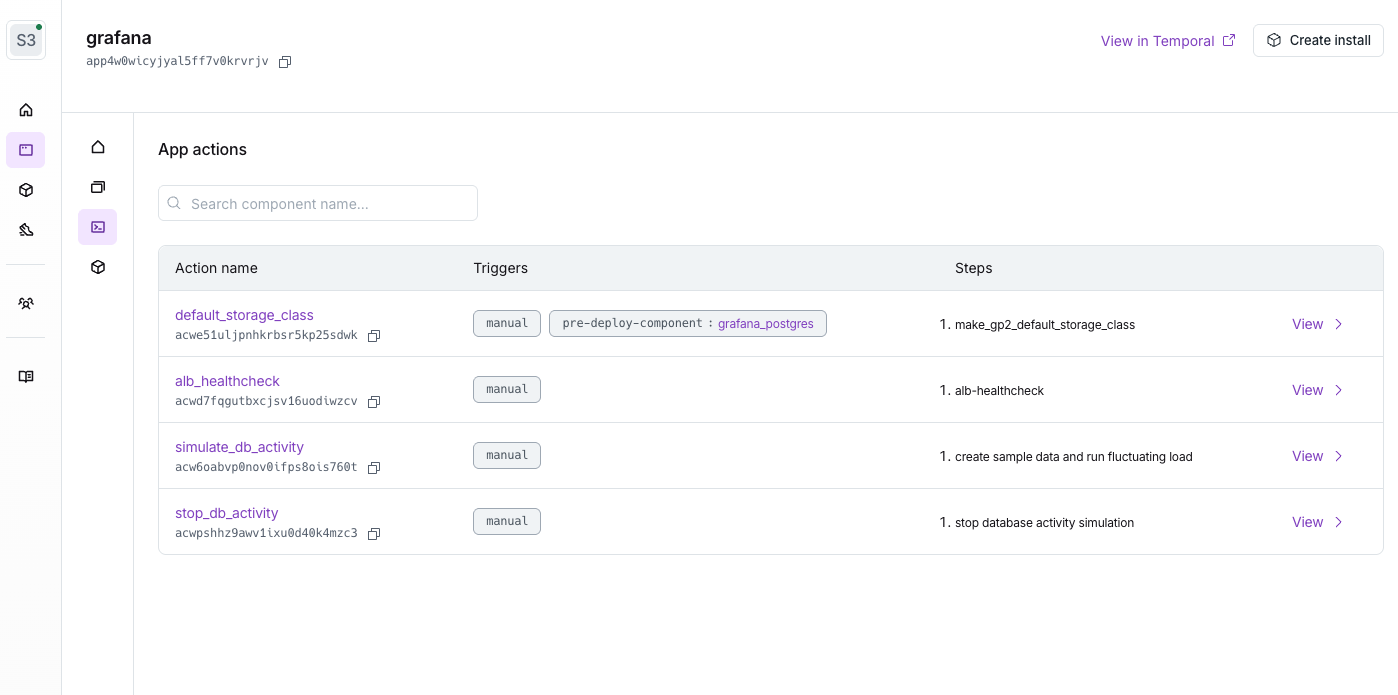
Create an `actions` directory at the root of the app, and create a TOML file for
each action. e.g., `alb_healthcheck.toml` `deployment_restart.toml`
`kubectl_logs.toml`.
Actions along with components, the sandbox and app metadata are sent to the Nuon control plane with the CLI command `nuon apps sync`. If you change and add additional actions, you need to run `nuon apps sync` again to upload the changes. But unlike components, actions do not need to be built.
 If actions need to connect to a VCS, use either a public repo (using a
`public_repo` block) or a private GitHub repo (using a `connected_repo` block).
Read more about VCS configuration [here](/guides/vcs).
For example, to pull logs from all Kubernetes pods in a namespace, you would
write an action like this:
```toml actions/kubectl_logs.toml theme={null}
# action
name = "kubectl_logs"
timeout = "30s"
[[triggers]] type = "manual"
[[steps]] name = "kubectl logs" inline_contents = """ #!/usr/bin/env sh kubectl
logs -n $NAMESPACE --all-containers=true -l app.kubernetes.io/name=ctl-api-api
"""
[steps.env_vars] NAMESPACE = "default"
```
For example, if you wanted to implement a healthcheck for an AWS ALB, you would write something like this:
```toml actions/http_healthcheck.toml theme={null}
# action
name = "http_healthcheck"
timeout = "0m15s"
[[triggers]]
type = "cron"
cron_schedule = "*/5 * * * *"
[[triggers]]
type = "manual"
[[steps]]
name = "healthcheck"
command = "./healthcheck"
[steps.public_repo]
repo = "nuonco/actions"
branch = "main"
directory = "common"
[steps.env_vars]
ENDPOINT = "https://your-app.{{.nuon.install.sandbox.outputs.public_domain.name}}"
METHOD = "HEAD"
EXPECTED_STATUS_CODE = "200"
```
We maintain a [collection of commonly-used
actions](https://github.com/nuonco/actions) in an open-source repo for you to
get started with.
## Running Actions
Actions can be triggered in several ways:
* Manually via the dashboard or CLI
* On a schedule
* In response to events
If actions need to connect to a VCS, use either a public repo (using a
`public_repo` block) or a private GitHub repo (using a `connected_repo` block).
Read more about VCS configuration [here](/guides/vcs).
For example, to pull logs from all Kubernetes pods in a namespace, you would
write an action like this:
```toml actions/kubectl_logs.toml theme={null}
# action
name = "kubectl_logs"
timeout = "30s"
[[triggers]] type = "manual"
[[steps]] name = "kubectl logs" inline_contents = """ #!/usr/bin/env sh kubectl
logs -n $NAMESPACE --all-containers=true -l app.kubernetes.io/name=ctl-api-api
"""
[steps.env_vars] NAMESPACE = "default"
```
For example, if you wanted to implement a healthcheck for an AWS ALB, you would write something like this:
```toml actions/http_healthcheck.toml theme={null}
# action
name = "http_healthcheck"
timeout = "0m15s"
[[triggers]]
type = "cron"
cron_schedule = "*/5 * * * *"
[[triggers]]
type = "manual"
[[steps]]
name = "healthcheck"
command = "./healthcheck"
[steps.public_repo]
repo = "nuonco/actions"
branch = "main"
directory = "common"
[steps.env_vars]
ENDPOINT = "https://your-app.{{.nuon.install.sandbox.outputs.public_domain.name}}"
METHOD = "HEAD"
EXPECTED_STATUS_CODE = "200"
```
We maintain a [collection of commonly-used
actions](https://github.com/nuonco/actions) in an open-source repo for you to
get started with.
## Running Actions
Actions can be triggered in several ways:
* Manually via the dashboard or CLI
* On a schedule
* In response to events
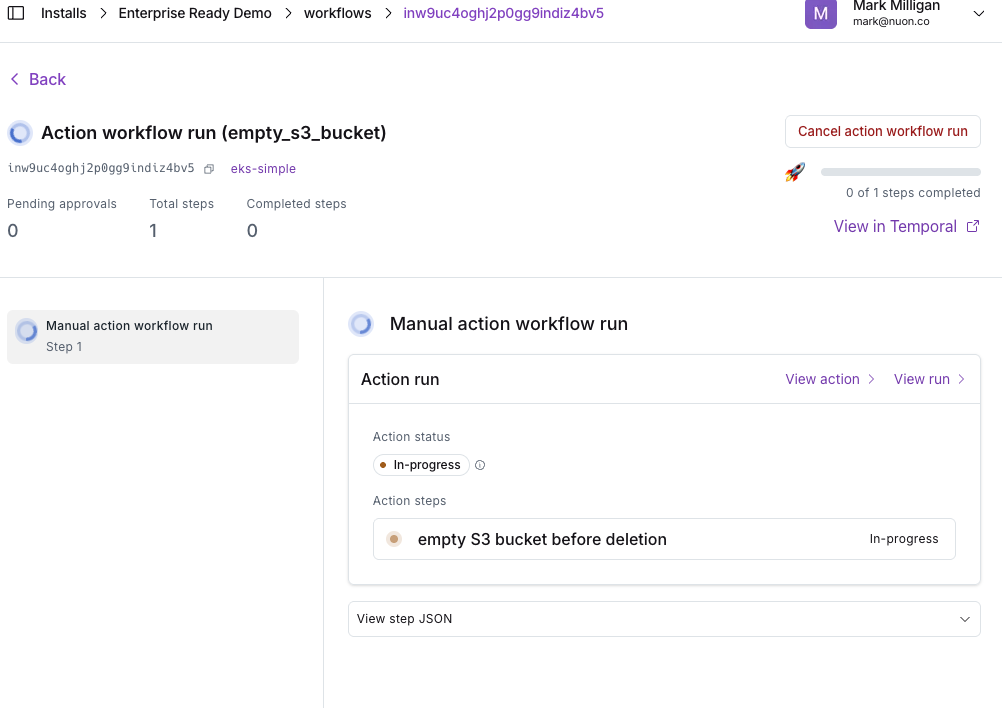 To run an action manually with the CLI:
```sh theme={null}
nuon actions create-run -w -i
```
## Action Triggers
Action triggers are now available for all workflows. You can now use the
following set of triggers:
* `pre-provision`
* `post-provision`
* `pre-reprovision`
* `post-reprovision`
* `pre-deprovision`
* `post-deprovision`
* `pre-deploy-all-components`
* `post-deploy-all-components`
* `pre-teardown-all-components`
* `post-teardown-all-components`
* `pre-deprovision-sandbox`
* `post-deprovision-sandbox`
* `pre-reprovision-sandbox`
* `post-reprovision-sandbox`
* `pre-update-inputs`
* `post-update-inputs`
* `pre-secrets-sync`
* `post-secrets-sync`
* `role-enabled`
* `role-disabled`
Each workflow trigger is called at the beginning or end of the workflow. In some
cases, such as `pre-provision` or `pre-reprovision` that include a stack-run,
the trigger will be called right after the runner is healthy.
### Role change triggers
The `role-enabled` and `role-disabled` triggers fire when a customer enables or
disables an [operation role](/concepts/operation-roles) in their install stack.
Use these to run validation, auditing, or setup tasks whenever elevated
permissions are granted or revoked.
### Component triggers
The following triggers require a `component_name` field to be set, as they are
tied to a specific component:
* `pre-deploy-component`
* `post-deploy-component`
* `post-teardown-component`
* `pre-teardown-component`
`pre-component-deploy` and `post-component-deploy` have been renamed to
`pre-deploy-component` and `post-deploy-component` for consistency with other
triggers. `pre-sandbox-run` and `post-sandbox-run` have been deprecated, in
favor of `pre|post-reprovision`, `pre|post-provision`, and
`pre|post-deprovision`
Action Triggers are documented in the
[Changelog 009](/updates/009-action-triggers-secrets-configs#action-triggers).
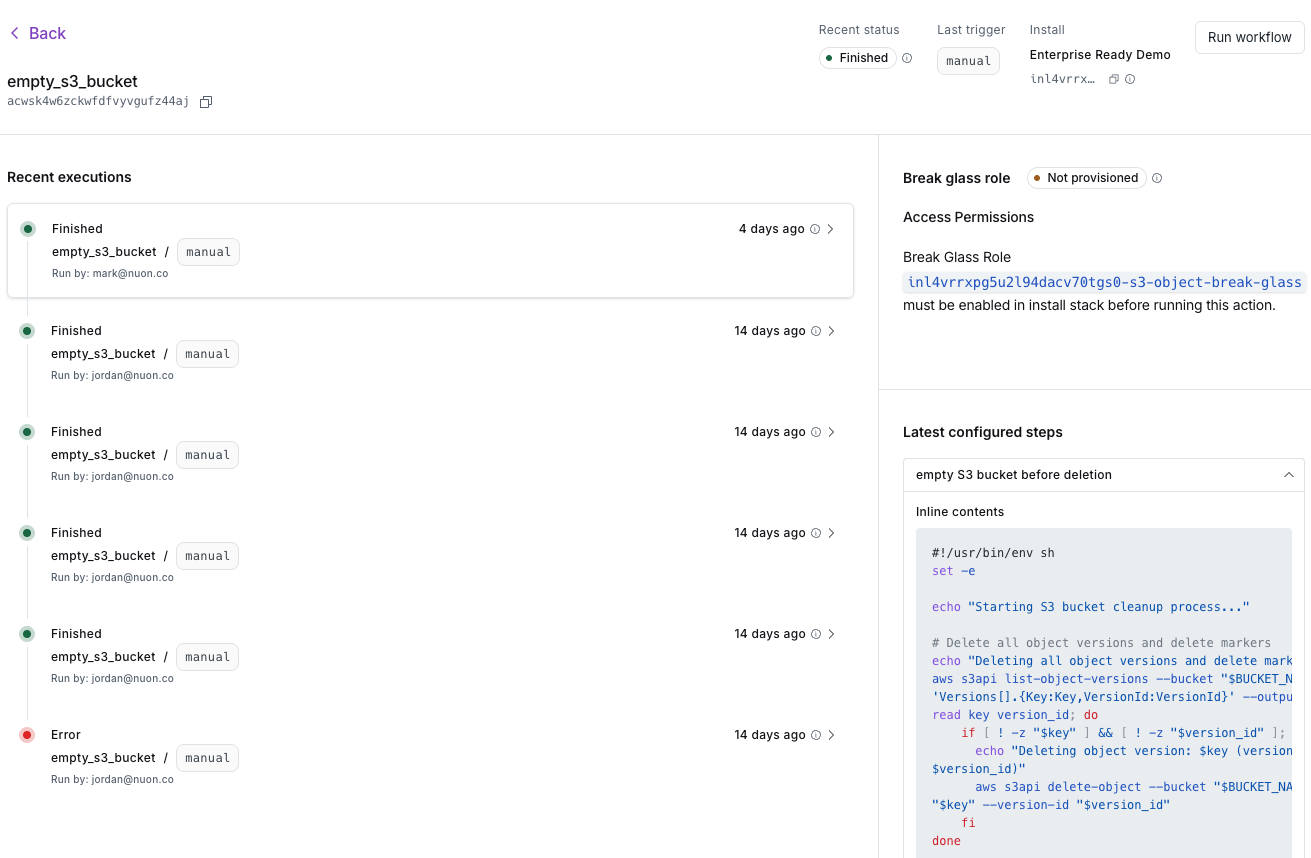
## Action History
You can view the history of action runs using the dashboard:
To run an action manually with the CLI:
```sh theme={null}
nuon actions create-run -w -i
```
## Action Triggers
Action triggers are now available for all workflows. You can now use the
following set of triggers:
* `pre-provision`
* `post-provision`
* `pre-reprovision`
* `post-reprovision`
* `pre-deprovision`
* `post-deprovision`
* `pre-deploy-all-components`
* `post-deploy-all-components`
* `pre-teardown-all-components`
* `post-teardown-all-components`
* `pre-deprovision-sandbox`
* `post-deprovision-sandbox`
* `pre-reprovision-sandbox`
* `post-reprovision-sandbox`
* `pre-update-inputs`
* `post-update-inputs`
* `pre-secrets-sync`
* `post-secrets-sync`
* `role-enabled`
* `role-disabled`
Each workflow trigger is called at the beginning or end of the workflow. In some
cases, such as `pre-provision` or `pre-reprovision` that include a stack-run,
the trigger will be called right after the runner is healthy.
### Role change triggers
The `role-enabled` and `role-disabled` triggers fire when a customer enables or
disables an [operation role](/concepts/operation-roles) in their install stack.
Use these to run validation, auditing, or setup tasks whenever elevated
permissions are granted or revoked.
### Component triggers
The following triggers require a `component_name` field to be set, as they are
tied to a specific component:
* `pre-deploy-component`
* `post-deploy-component`
* `post-teardown-component`
* `pre-teardown-component`
`pre-component-deploy` and `post-component-deploy` have been renamed to
`pre-deploy-component` and `post-deploy-component` for consistency with other
triggers. `pre-sandbox-run` and `post-sandbox-run` have been deprecated, in
favor of `pre|post-reprovision`, `pre|post-provision`, and
`pre|post-deprovision`
Action Triggers are documented in the
[Changelog 009](/updates/009-action-triggers-secrets-configs#action-triggers).
## Action History
You can view the history of action runs using the dashboard:
 You can view the history of action runs using the CLI:
```sh theme={null}
nuon actions list-runs -w -i
```
Or get details about a specific run:
```sh theme={null}
nuon actions get-run -r -i
```
## Action Permissions
Actions are run with the same permissions as the [Runner](/concepts/runners) in
each install.
You can view the history of action runs using the CLI:
```sh theme={null}
nuon actions list-runs -w -i
```
Or get details about a specific run:
```sh theme={null}
nuon actions get-run -r -i
```
## Action Permissions
Actions are run with the same permissions as the [Runner](/concepts/runners) in
each install.